During a cyber incident, you'll have questions.

The answers are already in your own systems.

CICADA IR helps you find them. It connects to the security tools you already have — on your network and in your cloud — works out what the attacker is doing or has done, and produces the report your board, your insurer and the regulator will want. The investigating happens on a single machine you run yourself. Nothing is sent to us. It all stays under your control.

One machine · OVA · QCOW2 · VHDX · running in 30 minutes · nothing to install on staff computers

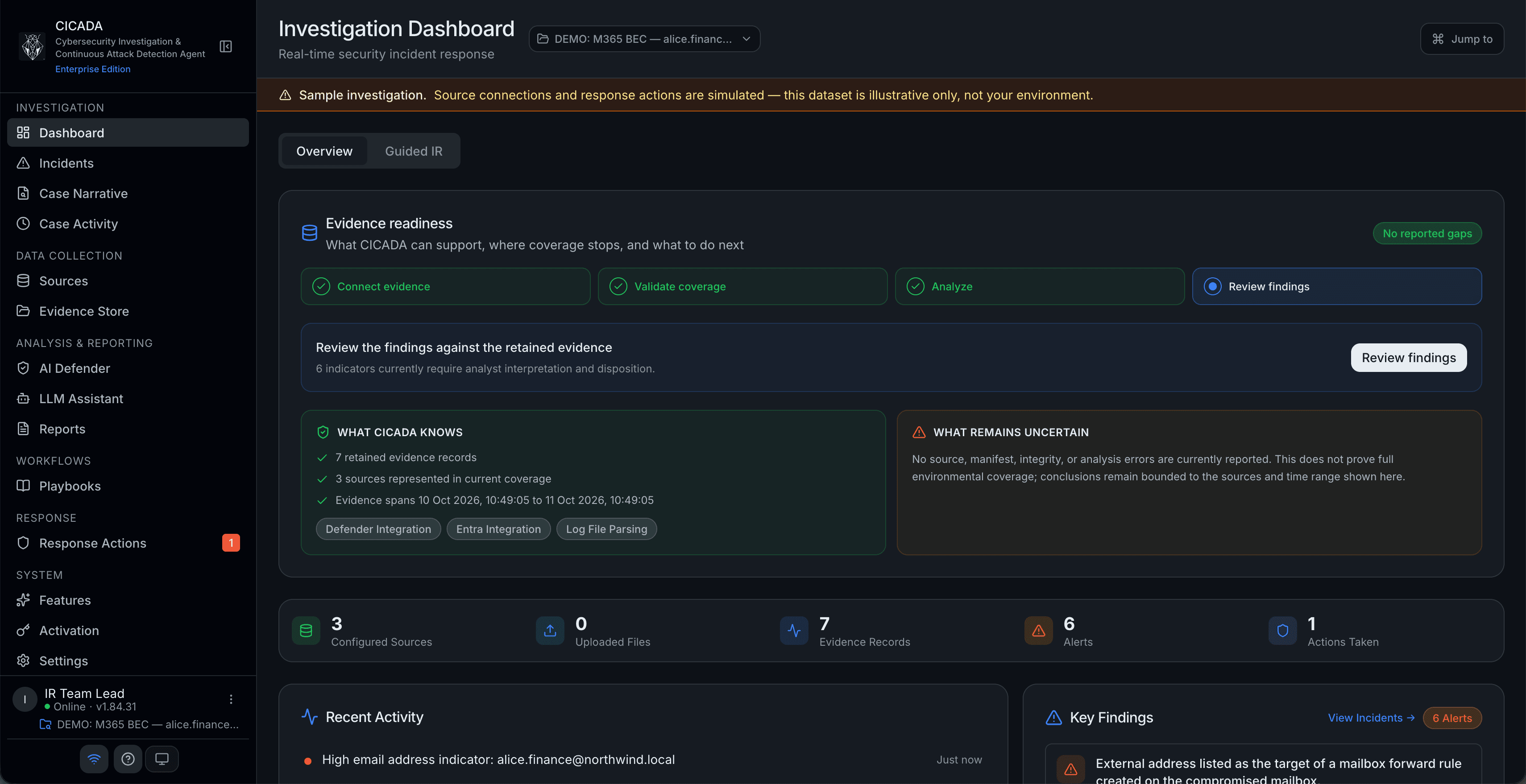
🔒cicada.local — Investigation Dashboard
CICADA IR Investigation Dashboard — KPI rail showing 5 sources, 26 uploads, 266k events, recent activity feed and critical key findings with MITRE ATT&CK technique IDs
The challenge

Most organisations can't say how bad it is for weeks.

The evidence exists. It's spread across the security tools you already pay for, and getting a clear account out of them means someone with the right skills opening five consoles, copying details between them and rebuilding a timeline by hand. That's why the honest answer to the first question a board asks is usually that the investigation is ongoing.

Without CICADA
  • ×Five consoles open. Five sets of credentials. Five filters.
  • ×Copying suspicious files and addresses between vendors by hand to check them.
  • ×Reconstructing the timeline in a spreadsheet.
  • ×AI tools that send your evidence to someone else's cloud.
With CICADA
  • One machine. One screen. One timeline.
  • Suspicious files, addresses and domains checked automatically against six threat databases.
  • Related events grouped into one account of what the attacker did, step by step.
  • The AI runs on your machine. Evidence stays under your control.
While it's happening

It doesn't wait for someone to notice.

CICADA is connected to your security tools, so it's already reading what they see. When something looks wrong it works out what should happen next and puts it in front of your team with the evidence attached.

Gathering more evidence it does on its own — searching for a file across your machines, pulling logs off a server, listing what's sitting on a file share. None of that changes anything, and waiting on it only costs you time.

Anything that would disrupt someone's work waits for a person. Disabling an account, cutting a machine off the network, blocking an address, forcing a password reset — each one goes to a named approver and is recorded against them. An action CICADA doesn't recognise is treated as needing approval too. That list is enforced by the software, not decided by the AI.

Trust without compromise

Built to run on a machine you own.

We're a new vendor. We don't expect blind trust. We earn it the same way good IR works: by being explicit about every artefact we publish.

Nothing leaves your control

One machine you run yourself. There is no service to sign up to, and it works even on a network with no internet connection.

It only reads

CICADA cannot change or delete anything in your systems. Anything that would disrupt someone's work goes to a named approver first.

Everything is accounted for

Every piece of evidence is tracked and signed, so it holds up later. Every release publishes a full list of the software inside it.

Sources (read-only)
Entra IDDefenderADCrowdStrikeM365
Your CICADA machine
Inside your network
Investigations · Evidence · Reports
The only thing that ever leavesThreat-database lookups you switch on yourselfNo investigation data. Ever.
What you get

Four things it does.

Every screenshot below is the actual product — no mockups.

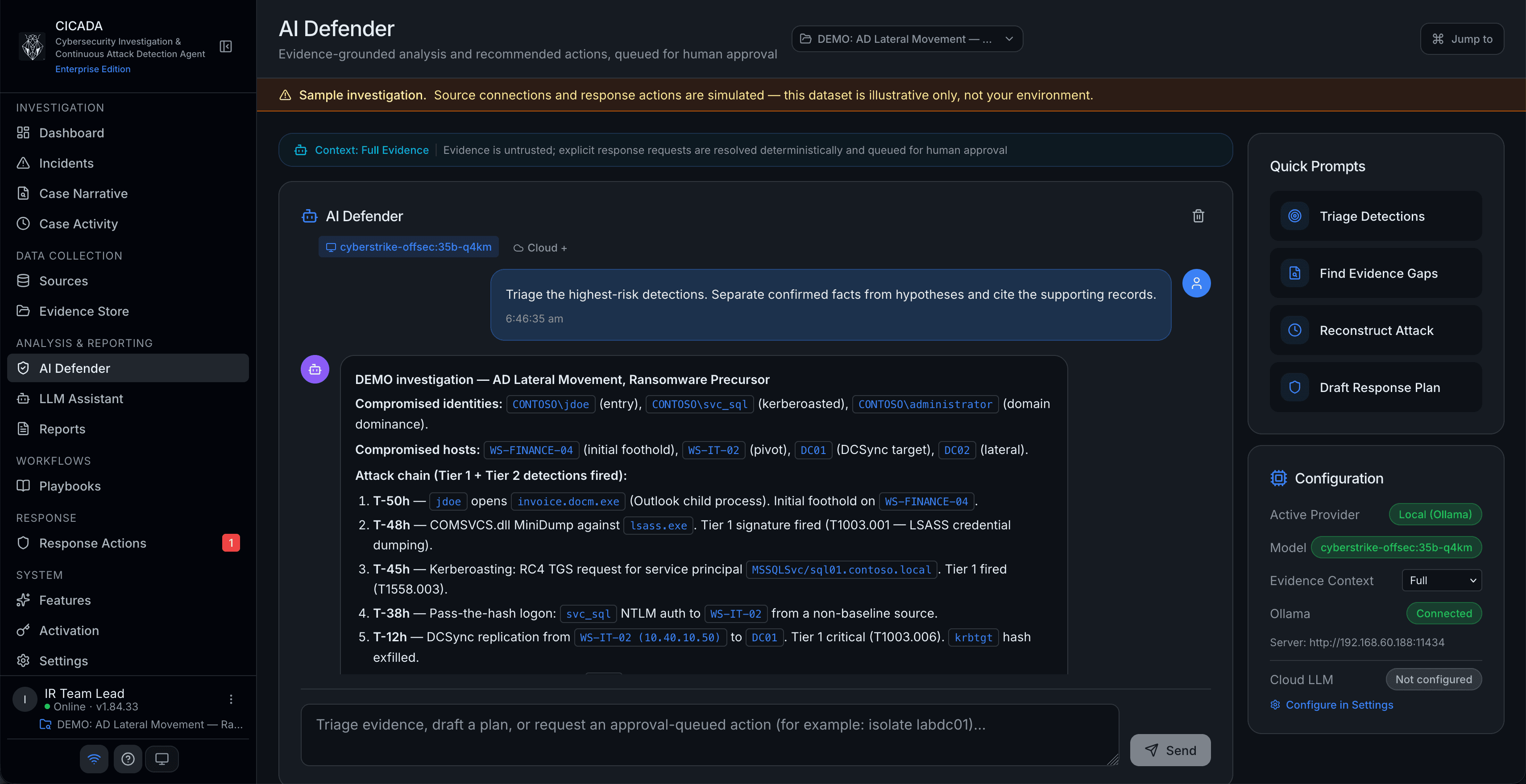
🔒cicada.local — AI analysis
CICADA IR AI assistant running a local model on the appliance, summarising suspicious files and addresses by severity
AI analysis

The AI runs on your machine, not someone else's.

Ollama, LM Studio, llama.cpp or any OpenAI-compatible local model runs end to end on the same machine as everything else, so your evidence is never sent to a model provider. Cloud models are available if you want them — switched on one provider at a time, with personal data and credentials blocked, and an audited setting you have to turn on deliberately.

Local LLM setup guide
🔒cicada.local — Detection
CICADA IR Incidents page showing critical incidents where an attacker gained higher access, with the steps they took and the accounts affected
Detection

It notices what a person reading logs would walk past.

Known-bad patterns are caught outright. Beyond that, CICADA looks for sequences of events that only mean something together, learns what normal looks like for each account and flags what isn't, and takes your analysts' own judgement into account. Related events are grouped into one account of what the attacker did, even when several accounts or machines are involved.

🔒cicada.local — The investigation
CICADA IR Sources page showing all five investigation stages complete and five connected data sources
The investigation

From the first sign of trouble to a finished report, in one place.

CICADA collects the evidence, analyses it, connects related events and brings them together for your team to review — each step following on from the last, over whatever time period you choose. Connecting it to Entra ID, Defender, Active Directory, CrowdStrike and Microsoft 365 is done through a setup wizard, and every connection is read-only.

🔒cicada.local — Reports
CICADA IR Reports page showing 15 report types with ready and AI-enhanced variants
Reports

The report your board asks for, written from your own evidence.

Fifteen report types covering the investigation itself, your legal and compliance obligations, and the summary your executives and insurer will want. Available as PDF, Word, HTML, JSON or Markdown. Includes notifiable data breach assessment, legal hold, how far the attacker actually got, and how their steps map to the industry-standard MITRE ATT&CK framework.

Connects to what you already have.

On your network and in your cloud. Every connection is read-only, and there is nothing to install on your staff's computers.

Data sources
Microsoft DefenderMicrosoft EntraActive DirectoryCrowdStrike FalconMicrosoft 365Microsoft PurviewSophos TaegisVaronisBigID
Threat-intelligence enrichment (opt-in)
VirusTotalAbuseIPDBShodanURLhausThreatFoxOTX AlienVault
LLM providers
Ollama (local)LM Studio (local)llama.cpp (local)Anthropic ClaudeOpenAIGoogle Gemini

Frequently asked questions

Where does my investigation data go?
Nowhere. All investigation data, evidence and reports stay on the machine you run, inside your network. CICADA IR never calls home — your licence is activated locally, and it works even on a network with no internet connection at all. See the Trust Center.
How is CICADA IR priced?
The Community Edition is free forever and includes core investigation capabilities. Professional and Enterprise plans are per-seat subscriptions — contact sales@cicada-ir.ai for a quote aligned to your team size.
How long does deployment take?
Under 30 minutes from download to first investigation. Import the machine image into your virtualisation platform, start it, activate your licence in the setup wizard, connect your data sources and start investigating. See the Getting Started guide.
What support do you offer?
Community users get documentation and community support. Professional includes email support during business hours (AEST). Enterprise includes priority support with defined SLAs.
Can I upgrade from Community to Professional later?
Yes. Upgrading is a licence key swap — your existing investigations, data, and configuration stay intact. No migration, no re-import.

Deploy in under 30 minutes.

One machine, three formats (OVA · QCOW2 · VHDX), and nothing to install on your staff's computers. Free Community Edition — full step-by-step in the Getting Started guide.